A HEC-RAS model alternative includes three key components:
one Geometry File
one Flow File
one Plan File that links a geometry file to a flow file
This guide will teach you how to create manage HEC-RAS model alternatives within your HEC-RTS watershed.
Build your HEC-RAS model and its associated alternatives within the HEC-RAS software to ensure correct setup before integrating them into your HEC-RTS watershed.
Importing an HEC-RAS Project
When importing a HEC-RAS project with multiple plans, all plans are imported into your watershed as separate model alternatives. You cannot select specific plans to import.
To import a project:
Go to the Setup tab.
Right-click the HEC-RAS icon in the Watershed Tree and select Import.
In the Select RAS project to import from dialog, navigate to the desired HEC-RAS project file (.prj) and click Open.
An Import Progress dialog will appear. Once the import is complete, it will close automatically.
The Message window will display RAS Import Complete and the HEC-RAS model alternatives will appear in the Watershed Tree.
Save your watershed.
Editing an HEC-RAS Alternative
To edit an alternative:
Go to the Setup tab.
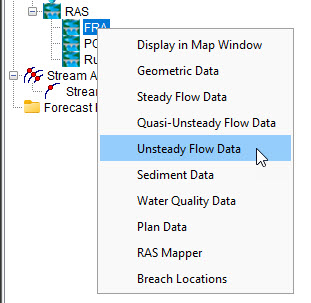
In the Watershed Tree, right-click the HEC-RAS alternative you want to edit.
Select the model component you wish to modify from the list.