HEC-DSS Collections
A Collection is a group or set of HEC-DSS time-series datasets that share a common location (A & B Parts), parameter (C Part), and time-step (E-Part). Any set of DSS time-series records for a given location, parameter, and time-step can be put into a collection, however, when applied to an ensemble, the records grouped into a collection must span a common time window.
The "collection" concept is implemented through an F-part naming convention. The F-part of each member of a collection has a collection ID string prepended to a common version label (F Part). The collection ID string is made up of: "C:" followed by a 6-digit collection member number (ID) and ending with a pipe symbol "|". The | is used as a delimiter; it separates the collection ID string from the standard F-part string that specifies the "version" or uniqueness of the data. The ID number must be 6 digits long and may be simple integers or alpha-numeric strings, but must be unique within the collection. Like the other pathname parts, the "version" string following the | will be the same for all members in the collection.
Below is an example pathname of a collection member:
/YUBA/SMARTSVILLE/FLOW/01JAN1997-30SEP1997/1HOUR/C:000042|ESP/
DSSVue Collection Utilities
The software for creating and managing DSS collections is provided in a DSSVue Collection Utilities Plug-In. This plug-in may be used in HEC-DSSVue Version is 2.2.1 or later. The plugin is included with HEC-ResSim 3.3 (and later), along with ResSim's Ensemble plug-in, so you do not need to do anything to activate either plug-in in ResSim. However, if you would like to use the Collection Utilities in a standalone version of DSSVue, the instructions for installing the plug-in are below.
To install the Collection Utilities Plug-In to a standalone version of DSSVue:
- Make sure that DSSVue is not currently running.
- Find the installation folders of this version of ResSim and the version of DSSVue you want to add the plug-in to.
- Copy the file: CollectionUtilities.jar
- from: ResSim's jar/ext folder
- to: DSSVue's jar/ext folder
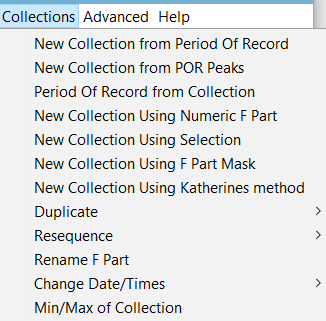
- When installed correctly, you'll see a new Collections menu added to DSSVue's menu bar the next time you launch DSSVue.
With the Collection Utilities Plug-In installed, a Collections menu is added to the menu bar of DSSVue providing access to several options for creating and managing collections. Many of these options represent different ways to create a collection. At present, collections can only be formed from individual records that already exist in DSS. Other options in the Collections menu include features to copy, re-number, rename, and perform some simple statistics on the collection members.