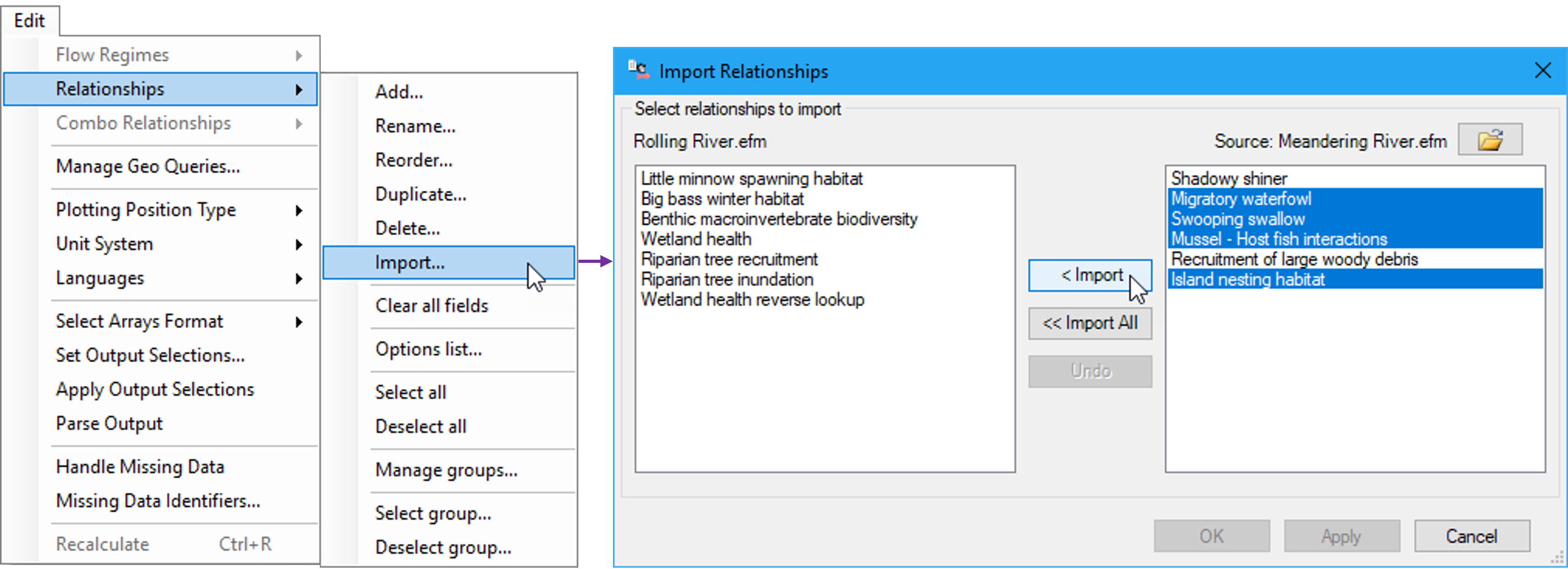
Applications of HEC-EFM are easy to initiate and can also borrow from existing applications. Incorporating pieces of existing models is done through menu options for import of both flow regimes and relationships. When “Edit – Relationships (or Flow Regimes) – Import…” is clicked, an interface will appear that allows users to browse to an existing (source) application, select the desired flow regimes or relationships, and perform the import (Figure 59). “Import…” is the only menu option that connects multiple model applications. All others (e.g., add, rename, reorder, duplicate, delete, select/deselect, manage and select/deselect groups) work within the open application. Please note that the “Edit – Relationships” menu is location-dependent and is only enabled when the user is working on the Relationships Tab. This restriction is also the case for the “Edit – Flow Regimes and Combo Relationships” menus (Properties Tab and Combo Relationships Tab, respectively).
Figure 59. Using the “Import…” menu option to add relationships from source to current project. This can also be done for flow regimes.