PDF
Download PDF
Download page FY25 PROSPECT 209 Class Critique.
FY25 PROSPECT 209 Class Critique
Critique by Course Module
| Module Name | Module Instructor | Notes |
|---|---|---|
| Day 1 | ||
| 1.2. Flood Risk Assessment Methodology | Richard Nugent | |
| 1.3. Basic Probability and Statistics | Beth Faber | |
| 1.4. Engineering for Non-Engineers or Economics for Non-Economists | Brennan Beam, David Ho, Richard Nugent | |
| 1.5. Risk Communication Requirements | Richard Nugent | |
| Using the HEC-FDA Program Workshop 1 | Julia Slaughter, Taylor Bolt | |
| Day 2 | ||
| 2.1. Incorporating Uncertainty into the Expected Annual Damage Computation | Beth Faber | |
| 2.2. Uncertainty in Exceedance Probability Functions | Beth Faber | |
| 2.3. Stage Discharge Relationship Uncertainty | Brennan Beam | |
| Hydrologic and Hydraulic Uncertainties Workshop 2 | Julia Slaughter, Taylor Bolt |
|
| 2.4. Project Performance and Geotechnical Analysis | Brian Hubel | |
| Day 3 | ||
| 3.1. Stage-Damage Relationship | Richard Nugent | |
| Stage-Damage Uncertainty Workshop 3 | Julia Slaughter, Taylor Bolt | |
| 3.2. Estimation of Economic Uncertainty | Richard Nugent | |
| Without-Project Conditions Workshop 4 | Julia Slaughter | |
| 3.3. Case Study, Southwest Coastal Louisiana Feasibility Study | Brian Maestri | |
| 3.4. Nonstructural Plan Formulation and Evaluation | Taylor Bolt | |
| Day 4 | ||
| Levee Assessment Workshop 5 | Julia Slaughter, Taylor Bolt | |
| Plan Formulation Workshop 6, Session 1 | Julia Slaughter, Taylor Bolt | |
| 4.1. Impact Areas and Index Points Selection | Taylor Bolt | |
| 4.2. Plan Formulation and Evaluation Using Risk Assessment | Richard Nugent | |
| Plan Formulation Workshop 6, Session 2 | Julia Slaughter, Taylor Bolt | |
| 4.3. Case Study: Coastal Texas Evaluation | Brian Maestri | |
| Day 5 | ||
| Plan Formulation Workshop 6, Final Session | Julia Slaughter, Taylor Bolt | |
| 5.1. Case Study: Lower Sacramento River | Stephen Cowdin, Nathan Pingel |
Generalized Notes
Workshop Instructions
- Student made mistakes in the hydraulic data import because they entered the return interval values in the column right next to the name instead of the Return Interval column in the UI. Issue is due to not fully following the instructions, but thinking the table in Confluence corresponded to the column that needed to be changed (column 2 in the FDA UI, but the FDA UI column 2 was not included because it is calculated automatically by FDA). If students read the column headers and the instructions carefully they'd know to enter the return interval values in the FDA Return Interval column.
- Idea to Fix Issue: Add the Annual Exceedance Probability column to the Confluence table and just say... "FDA calculates based on entered Return Interval" - or something like that.
- Students would sometimes just look at the overview table to try and complete the scenarios, alternatives, alternative comparison reports, and not realize it was just an overview and there were summary tables later in the instructions that gave the specific study elements to select.
- Idea to Fix Issue: Remove the overview list and add a screenshot instead, then they maybe won't try and complete the study element selections without seeing the detailed tables. Or set the detailed tables (e.g., Scenarios in Workshop 6, Part 2) outside of the expandable section so it can't be missed.
- Threshold Values - Scenario Summary Table, saying "User Defined" is confusing.... need to rework instructions to provide a clearer understanding of what user-defined means.
- GIF for seeing the without project threshold values was too quick to follow.
Software Bugs, Issues and Suggestions (or Requests for Improvements)
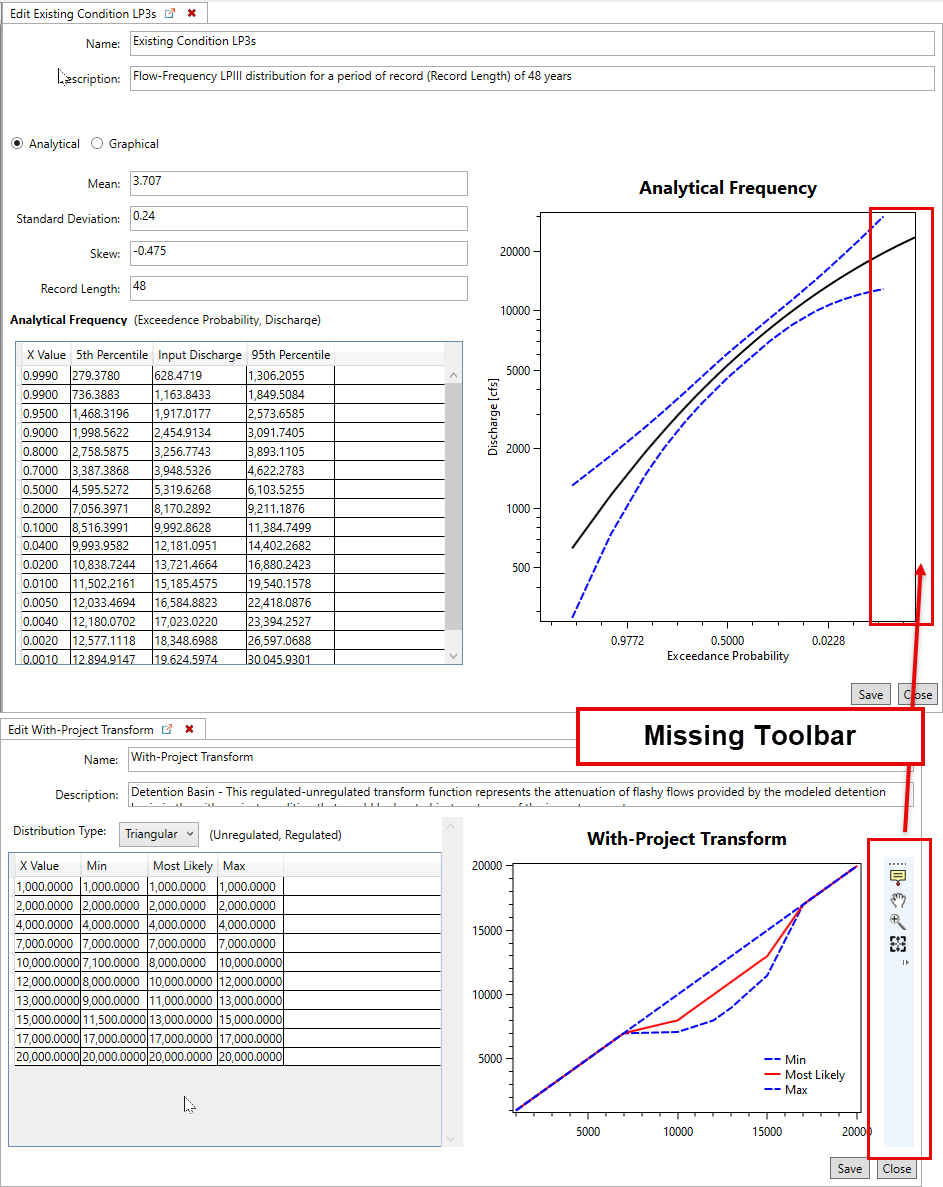
- Issue: Frequency Plot – missing toolbar
- Bug: Import Structures - attribute selection list cannot be unselected after being selected (e.g., make a mistake and with Other Value, but SI doesn't have an Other Value attribute - cannot go back to blank).
- Bug: Imported a Structure Inventory - then tried to edit it - FDA said the SI didn't exist. Copying the base files outside of the study directory and reimporting the same structure inventory fixed the issue.
- Bug: Add coordinate projection file to the Study Properties (click Save more than once) Archives the projection and causes an uncaught exception when trying to compute aggregated stage damages.
- Workaround: (1) Remove the Projection file from the FDA study directory (with FDA closed, or open). (2) Add the Study Projection file from the Study properties. (3) Delete the Hydraulic data and then reimport the hydraulic data. Bug Fix: IN-PROGRESS
- Improvement: Add the ability to view a summary of the data selected for each scenario (do not allow to edit, but just view the data saved to the FDA study file). Having the ability to see an overview would be extremely helpful for double-checking for proper assignments without having to open each scenario and selecting each impact area.
- Bug: Renaming Impact Areas (or Hydraulic Data) from the Editor dialog NOT the Rename dialog - causes issues with the software.
- Recommendation: Remove the ability to edit the study element Name from the Editor (disable the Name box when not in the Create New... interface).
- Bug: If you didn't compute your scenario and you try and view it you get an exception.
- Recommendation: Rather than an exception - open a message window that says you need to compute your scenario.
- Bug: Uncaught exception if you try and compute the Alternative Comparison Report before you successfully compute all the Alternatives. This specific issue was due to the Issue identified below for the Alternatives.
- Issue: If the Analysis Years entered in the Alternative does not match the Period of Analysis (set in the Study Properties), then the following message appears "The discounting parameters are not valid, discounting routine aborted." This message is not inaccurate, it is just not clear what the user must do to fix the issue.
- Recommendation: Update the message to clarify that the entered Alternative Years does not match the Discounting Information's Period of Analysis (set in the Study Properties).
- Bug: Steady state hydraulics not found when computing the stage damage even though it was imported into the study.
- Reimported the hydraulic information and stage damage was computed.
Student's Unanswered Questions
Workshop Parking Lot
- Do you need to update your Version 1.4.3 study and import it into FDA 2.0?
- If you do, why?
- If you do, what must you do to complete the update for your study? For example, must I have a terrain file for the 2.0 study?
- When and why do you use Index Points in Version 2.0?
- How does FDA use the hydraulic data to set the flow frequency function based on the analytical LP3 parameters they enter?
- Please explain more about the Target Threshold Stage — pictures (for levees and non leveed projects) would be very helpful.
- A student showed me their FDA 2.0 study and asked why the stage-damage generated curves for RES damage category + Vehicle asset category is a flat curve at zero? They specifically tried to produce stage-damage curves for known either Auto only Auto damage category) or RES (damage category, Vehicle depth-percent damage curves) for residential structures with vehicles. My thought is - there is a Auto damage category in the occupancy type dataset, but there isn't any Auto occupancy type name in their structure inventory.