Select the either the Download or Open File option.
Note: Images are from following the DOWNLOAD option. However, the instructions are the same.
Navigate to the location to save the file.
BE SURE TO SAVE IT IN A LOCATION YOU HAVE WRITE-ACCESS and not your user area, or it won't run. Recommended: C:/Programs/ResSim
Save the file.
Navigate to the location with the saved file (e.g., C:/Programs/ResSim). Right-click on the file and select Show more options.
Point to 7-Zip and click Extract Here.
You now have the HEC-ResSim software. Double-click to open the software folder.
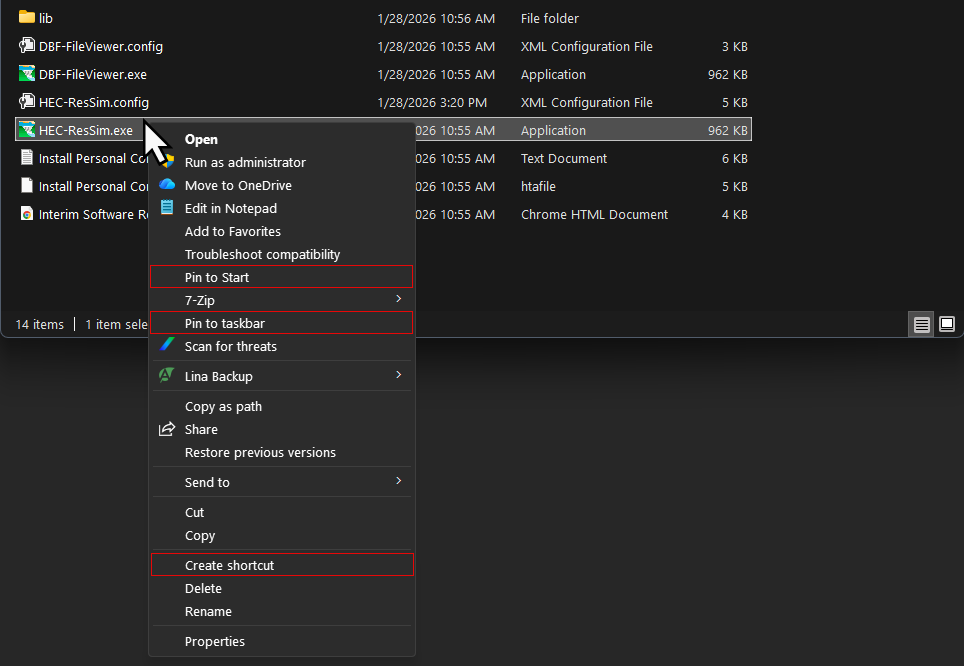
Inside the extracted folder, right-click the HEC-ResSim.exe and select Show more options.
From the opened shortcut menu complete any or all of the following to easily access the software during the workshops:
Select Create shortcut, and then drag the created shortcut to your desktop. Either double-click the shortcut to open the software, or right-click on the shortcut, select Show more options and complete the next one or two steps.
Select Pin to taskbar to add the software to the taskbar.
Select Pin to Start to add the software to the Start menu.
To open the software, double-click on the shortcut, or click the pinned software icon. Accept the Terms and Conditions. The HEC-ResSim software is now ready for use.