Download page Elevation Rate of Change Limit Rule.
Elevation Rate of Change Limit Rule
An Elevation Rate of Change Limit rule describes the allowable change when increasing or decreasing pool elevation values. A single rule of this type will only limit a rising pool or a falling pool, but not both. To describe both increasing and decreasing limits, you must define two rules and set the type of one to increasing and the other to decreasing. Since this rule watches the pool elevation, this rule type is only available for the reservoir (pool) release element.
To define or edit an Elevation Rate of Change Limit rule:
Select Elevation Rate of Change Limit for the Rule Type in the New Operating Rule dialog.
Or, if you want to edit an Elevation Rate of Change rule you have already created, select it from the Zone-Rules Tree.
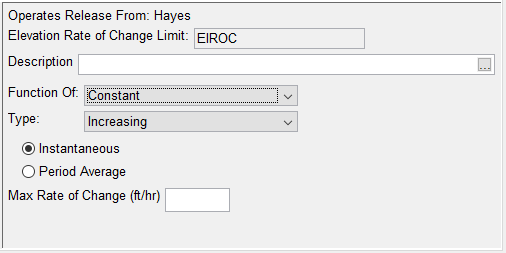
The edit panel of the Operations tab of the Reservoir Editor will display the Elevation Rate of Change Limit rule editor ("Figure: Elevation Rate of Change Limit Rule Editor - Function of Constant"). The name and description of the rule will appear in the Elevation Rate of Change Limit and Description fields.
Figure: Elevation Rate of Change Limit Rule Editor - Function of Constant
Function Of — An ElevationRate of Change rule can be Constant, or it can vary with:
Reservoir Inflow
Reservoir Release
Type — this is the Limit type. Select either Increasing or Decreasing. Note: when evaluated, an Increasing Flow Rate of Change Limit results in a maximum release limit and a decreasing Flow Rate of Change Limit results in minimum release limit
Instantaneous or Period Average Radio Buttons — These radio buttons allow you to choose whether or not the rate of change rule applies to the current timestep (Instantaneous) or to a range of timesteps (PeriodAverage). When Period Average is selected, you must enter the time period, in hours, over which the change in elevation applies.
Max Rate of Change—depending on your Function of selection…
Constant—you will either be presented with a single field — for a constant value in units of elevation (ft or m) per hour. "Figure: Elevation Rate of Change Limit Rule Editor - Function of Constant" shows this view of the Flow Rate of Change rule editor. This view will change to include a field for the period if the Period Average option is selected.
Inflow or Release—you will either be presented with a table. Enter the relationship between the selected independent variable and the maximum rate of change limit. The limit is described in units of elevation (ft or m) per hour, regardless of the compute interval. "Figure: Elevation Rate of Change Limit Rule Editor - Function of Time-Series" shows this view of the Flow Rate of Change rule editor. This view changes to include a field for the period if Period Average is selected.
Figure: Elevation Rate of Change Limit Rule Editor - Function of Time-Series
Interpolate — enter the interpolation type for looking up values in the table. You can choose from the standard options of Linear, Cubic, or Step. See "Select the Interpolation Type" for an explanation of these options.
When you have finished entering data for the Elevation Rate of Change Limit rule, be sure to click Apply before moving on to the next rule.