Like a rule, an existing IF_Block can be added to the rule set of any zone or conditional block.
To add an existing IF_Block to a zone:
Right-click on the zone in the Zone-Rules tree.
Select Use Existing IF_Block… from the node's context menu.
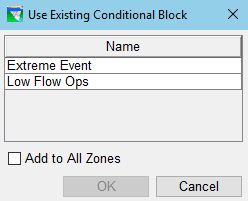
The Use Existing Conditional Block dialog will open ("Figure: Use Existing IF_Block Dialog"). Select the IF_Block you want from one of the white rows in the table and clickOK. [Grey rows in the table are IF_Blocks that are already being used in the rule so are not available to be added again.]
Figure: Use Existing IF_Block Dialog
The IF_Block will appear at the bottom of the selected zone's rule set.
To add the IF_Block to all the zones in the current operation set:
Activate the checkbox in front of Add to All Zones before clickingOK in the Use Existing Conditional Block dialog—OR—
Right-click on the IF-Block in the Zone-Rules tree and select Add IF_Block to all Zones from the context menu.