- Right-click on Alternative Comparison Reports in the Study Tree and select the create new option.

- Specify a useful Name and Description (optional, but recommended).
- For the Without Project, select the appropriate alternative (e.g., Without Project).
- Select a with-project condition alternative.
- Click Add Comparison to include additional with-project condition alternatives, if applicable. By default the alternative comparison report dialog contains one With Project condition. Select the appropriate with-project condition alternatives to include in the comparison report.
- To remove an added comparison, select the comparison (e.g., Levee and Nonstructural) and click Remove Comparison.

- When the desired without and with project comparison(s) have been added and selected, click Save and Close.
- Right-click on the created alternative comparison report and select View Results.

- View the results for the desired With-Project Alternative (e.g., Levee Only Plan), and desired measurement of damage: expected annual damage (EAD) or average annual equivalent damage (AAEQ).
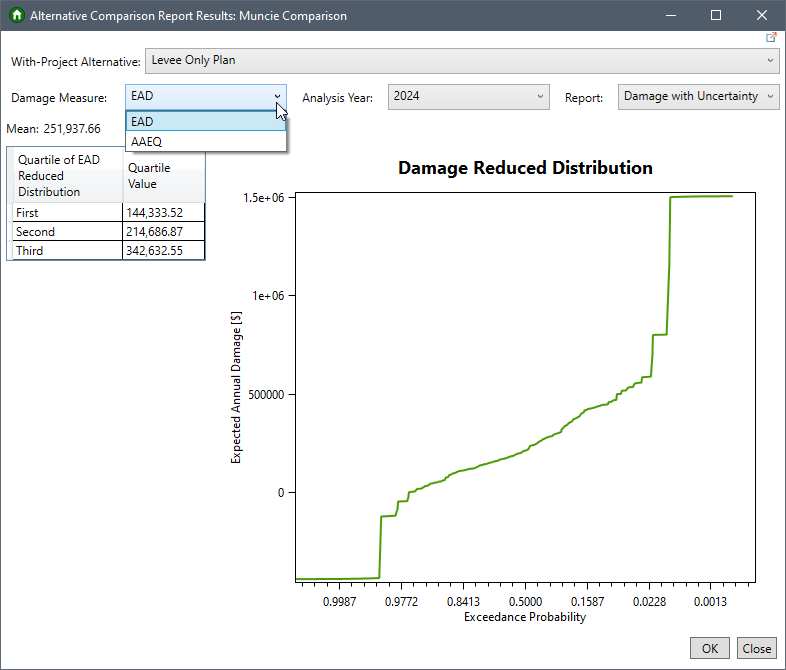
- If EAD is selected, review the results by Analysis Year and report options.
- For either damage measure, the Report options include: Damage with Uncertainty, Damage by Impact Area, or Damage by Damage Category.

Review the Alternative Comparison Report Results page for more information.