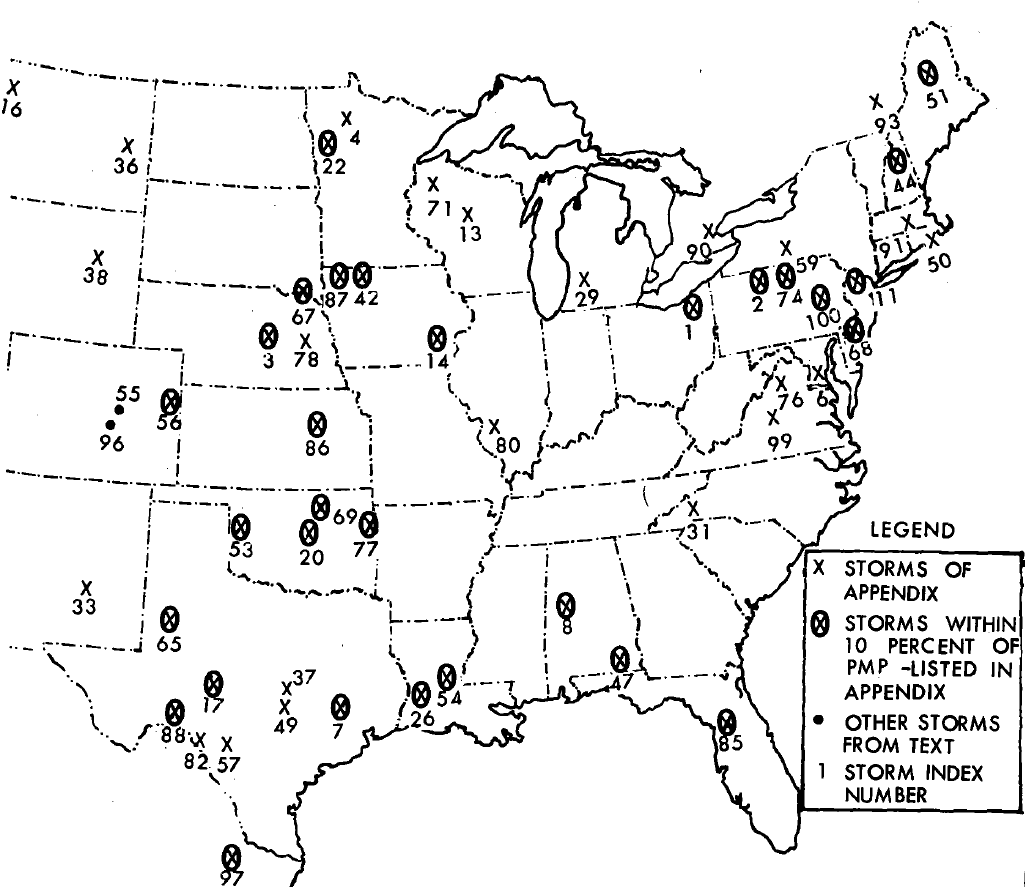
Depth-area-reduction relationships used in this workshop were developed from depth-area-duration information in NOAA’s Hydrometeorological Report No. 51 (HMR 51, https://www.weather.gov/owp/hdsc_pmp). The historic storms contained in HMR 51 were influential in setting the level of Probable Maximum Precipitation (PMP) for the Eastern U.S. Below is the figure from HMR 51 showing the locations of the more influential storms used to develop PMP index maps.
Only depth area duration information for storms within the state of Texas or near the study area were selected for this tutorial, this included nine historic storms:
Storm 7
Storm 17
Storm 26
Storm 37
Storm 49
Storm 57
Storm 65
Storm 82
Storm 88
The figure below shows an example of the depth-area-duration table from the Appendix of HMR 51 for one of these storms.
Set up the Meteorologic Model
Open the Village_Creek.hms project file
From the Components menu, create a new Meteorologic Model and name it Hyp_HMR51_Storm7 and in the Meteorologic Model editor panel, select Hypothetical Storm for the Precipitation method.
On the Basins tab, select Yes to Include Subbasins for the Village_Creek Basin Model.
Make the following selections for the Hypothetical Storm Meteorologic Model:
Computation Point: Basin: Village Creek, Element: NechesRv_Nr_Beaumont
Area Reduction Method: Parametric
Storm Area : 1130.1 sq mi (this is optional and used if you want to override the area from the Computation Point)
Your editor panel should look like the image below
Before adding the depth area duration data for Storm 7, copy the Meteorologic Model to create a new Meteorologic Model and title it Hyp_HMR51ShortStorms.
In the next step, you will fit the parameters to the data and fill in values for Normalization Factor, Constant Exponent, Dynamic Exponent and Holder Exponent.