Download PDF
Download page Removed Features.
Removed Features
This is a (incomplete) running list of features that have been removed from ResSim and from which versions they were removed.
Feature & Program Location | Removed | Notes |
|---|---|---|
Time-Series Icons Watershed Setup | No Longer in ResSim as of v3.3 | Time Series IconsTime Series Icons Note: Although Time Series Icons can be created in the Watershed Setup module of ResSim, they are not accessible from the other ResSim modules and so are rarely, if ever, used in ResSim. For more information about Time-Series Icons, refer to the CWMS User's Manual. |
Edit Lock Configuration | removed as of v3.5 | The Edit LockBefore you can add, remove, or edit schematic elements in your watershed, you must lock the configuration for editing. The easiest way to lock the configuration is by using the Edit Lock button, located to the right of the Configuration Selector. A less obvious way is by selecting Allow Editing from the Edit menu. "Figure: Edit Lock" illustrates the states of the Edit Lock. Remember, the Lock button must appear Locked in order for you to edit your configuration.
Figure: Edit Lock 
The concept of locking the configuration to allow editing is counter-intuitive to most users. However, if you understand where the lock originated, it may make more sense. You see, when ResSim was first designed and built, it was part of a multi-user, client/server system. In order to function properly in that multi-user environment, the ability to lock out other users so that only you could edit the watershed was an important feature. Now that the multi-user framework is no longer being actively used, the lock has become redundant. It will be removed in a future version of ResSim. |
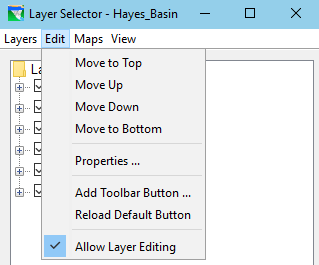
Layer Editing Lock Layers Editor | removed as of v3.5 | Allow Layer Editing LockEdit("Figure: Edit Menu")—this menu provides tools for rearranging layers, viewing and editing layer properties, and adding and removing user toolbar buttons. Figure: Edit Menu
|
Working R&D Routing Method Reach Editor | removed in v3.5. | "Working R&D" RoutingThis routing method worked in ResSim 3.1, but was broken in v3.3. It is believed that the method was no longer being used by anyone and is not needed. RSS-318 - Getting issue details... STATUS |
Vertical Datum | removed in v4.0 | Vertical Datum FeatureThe HEC DSS, CWMS, and ResSim teams were in long collaboration to develop vertical datum capabilities to assist users with the common work on converting data from one vertical datum to another, as well as viewing data in a selected datum. ResSim 3.4-beta code first implemented a vertical datum feature with an early iteration of the newly developed DSS vertical datum. However, the DSS code evolved, and around 2020 it became clear that the ResSim vertical datum feature was not working as designed. After extensive investment in trying to redesign and build the feature, it was concluded that it could not be fixed for the ResSim 3.5 release, and it was "hidden in plain sight" in v3.5. The CWMS team recognized that user scripts work well and reliably, so the costly work of fixing the feature has not been prioritized. During testing of CWMS 3.5, vertical datum feature was found to cause more issues than it solved. For ResSim 4.0 the vertical datum has been completely removed. RSS-1290 - Getting issue details... STATUS RSS-70 - Getting issue details... STATUS |